Routing rules
Send activity cards to Slack channels or teammates when community activity matches a rule.
Overview
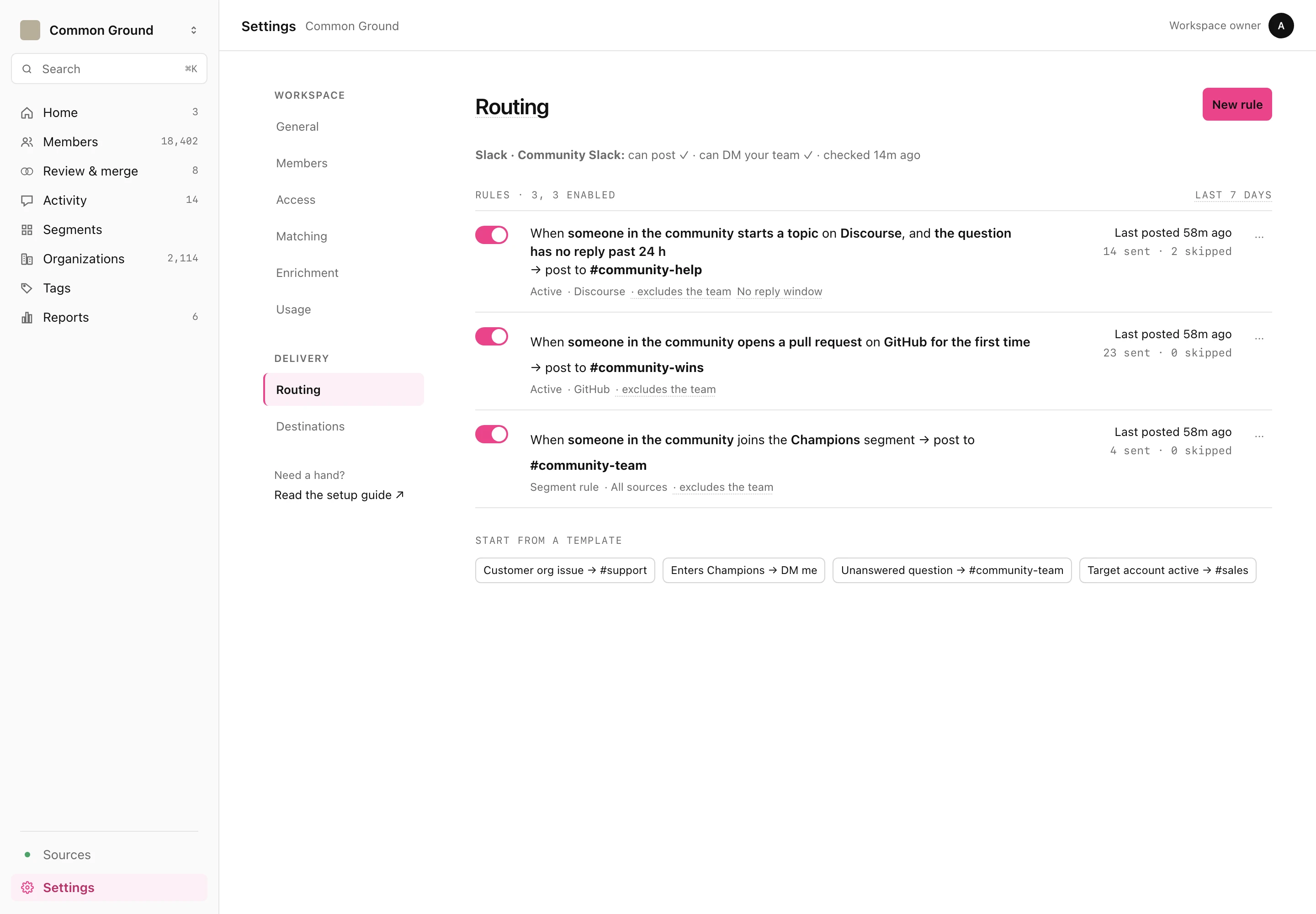
A routing rule sends community activity cards to a Slack channel or teammate. Rules exclude your team unless you include them explicitly.
Each card shows the person’s name, organization, first-seen date, linked accounts and latest activity. It also links to their Datum page. Cards contain titles and details without message text or email addresses.
Routing sends direct messages only to your team. This restriction applies to rules, tests and manually sent cards.
Configure
Slack routing requires the connected Slack app. A Slack export has no token and cannot send messages. Without a Slack connection, Settings → Routing links to Connect Slack.
Run ocmgr connection setup slack for setup instructions in the terminal.
The app needs chat:write for channel posts and im:write for direct messages. Datum includes both in its app and deploy/slack-manifest.yaml.
Add any missing permissions to older Slack apps. Reinstall the app after changing permissions.
Only workspace owners can view or change Slack routing rules. Run /invite @Datum in each destination channel. Direct-message recipients need no invitation.
Basics
Agent rules
Settings → Routing has two tabs: Slack rules and Agent rules. Choose Agent rules to see what Claude routines and connected agents react to. Each row identifies its kind. Expand it to find Delivery history →, which opens Destinations. Webhooks and other delivery destinations stay in Settings → Destinations.
Claude routines have the Workspace routine label and use the first line of their instructions as the title. They show the trigger, status, and last successful delivery. Expand a row to see its filters, full instructions, failure counts, and controls.
Choose Add Claude routine to create a routine for Send to…. Enter its trigger URL, token, and instructions. Keep Only when a teammate sends someone (no automatic events) selected. A new routine starts with it on and no topics ticked. Choose Create routine.
The row shows On demand only. Choose Edit to change its instructions or enable automatic events.
Owners can choose Add Claude routine, Edit, Enable or Disable here. Destinations uses the same editor. Members can see routines, but they cannot change them. See Start a Claude routine for the setup instructions.
Agent-managed subscription rows show the agent, trigger, filters and purpose. Expand a row to see the connected person and the subscription details. You cannot change these subscriptions here. Ask the agent to change or renew them. If a description is missing, ask the agent to subscribe again with a purpose, for example “Draft a welcome note in #community”.
Each row shows when the agent created the subscription, when the subscription expires and its last successful delivery. The seven-day count covers that trigger across your workspace. Owners see all subscriptions and can choose Cancel subscription. Members see the subscriptions of their own connected agents.
To add a subscription, ask ChatGPT to watch for something, for example a new person in Champions. See Agent event triggers.
Create a rule
- Open Settings → Routing → Slack rules.
- Choose New rule, or choose a template.
The templates are Customer org issue → #support, Enters Champions → DM me, Unanswered question → #community-team and Target account active → #sales. A template only fills in the panel. Datum saves nothing until you create the rule.
The panel describes the rule in four parts:
| Part | Contents |
|---|---|
| When | A sentence of three choices. The first is who: someone in the community or anyone, team included. The second is the event: does anything, an event type, or joins or leaves a segment. The third is the source: any source or one source. |
| Only if | Optional Activity tag is, Person tag is, Member is and Tone is conditions. + Add condition adds a condition. Its × removes it. Activity rules also take Organization tags (the person’s organization carries one of them) and No reply after hours (an unanswered question, after that many hours). |
| Post to | A channel or teammate from Slack, in a Slack connection. enter a Slack id… accepts a channel or user id. |
| Name | The rule’s name. An empty field uses Datum’s suggestion. |
Preview shows the card and its event-dependent fields. Leave out my team is the same choice as the first word of the sentence.
Without a Slack connection, Post to says No Slack connection yet with a Connect Slack link, and Create rule and Send a test stay disabled.
Press Create rule. Datum saves the rule disabled. It sends no activity cards until you enable it.
Direct messages go to your team only
The recipient list includes only your team. Recipients need a verified address on a team domain or the team tag.
Set team domains under Settings → General → Your team.
Choose what a rule watches
| Rule | Behavior | Configuration |
|---|---|---|
| Source | Tracks one source, such as GitHub, Discourse or the Push API | Select a source. Select does anything to include all its event types. With any source, the event list shows the event types of the sources connected here, and a type several sources share names them. |
| Member | Tracks one person across sources and follows merges | Add Member is with the member id. |
| Segment | Announces entries and departures from a segment | Select joins or leaves a segment. Select the segment. |
Notify me on a member’s page creates a member rule. See Notify me.
To hand one person, one activity or one organization to an agent instead of Slack, see Send to an agent. To post an organization’s card, see Send a card.
The source list starts with your connected sources, under Connected here. The busiest source is selected at the start. Webhook and Push API sources, and sources such as HubSpot or Typeform, show together as Push API, followed by the connection names. A Push API rule watches all of them. Not connected yet lists the other sources. Thus, you can write a rule before you connect a source.
A rule needs a source, a member or a segment. Thus, any source needs Member is or a segment. A saved rule keeps its source and trigger. To change the source or the trigger, create a new rule.
Segment rules accept only the Person tag is condition. They cannot use a source, event type, tone, activity tag or member condition. The panel shows conditions that do not fit in red. This includes filters copied from Activity.
While these conditions stay, Create rule and Send a test stay off. Their tip tells you why. Remove the conditions, or choose a different trigger.
Narrow it with filters
Every condition must match. Within a condition, any listed value can match. Adding a repository restricts the rule further.
| Condition | Matches |
|---|---|
| Event type | Listed types, such as issue_opened |
| Tone is | Events with the selected thread tone. Events without tone do not match. |
| Activity tag is | Threads with the selected tag |
| Person tag is | People with the selected tag, such as champion |
| Who | someone in the community excludes your team. anyone, team included includes them. |
The CLI and agents support more filters: repo_names for GitHub repositories, channel_ids for Slack channels and category_ids for Discourse categories. first_time_contributor checks the first activity of the person on a source, across all their accounts. When you save, Datum refuses unknown filter keys.
Send these to Slack… on Activity copies the current filters into the panel. If the view has no source filter and all events in it come from one source, the panel selects that source. The panel shows the filters that rules do not support, such as title searches and dates.
Test it, then enable it
Press Send a test in the panel. This saves the rule disabled and sends a test card.
For an existing rule, open its ··· menu. Choose Send a test message.
Test cards contain invented content and ignore conditions. They verify the card’s appearance and Slack’s acceptance. You can send one test per rule per minute.
Turn on the rule’s switch after checking the test. Matching activity can now produce cards.
Turn off the switch to pause the rule. Choose the rule’s name or Edit to change it.
Archive in the ··· menu permanently stops the rule. Datum retains the rule and its delivery history.
See what it delivered
Each rule row shows its source, trigger, destination and sent-card count. Disabled rules show Disabled. For skipped cards, the row shows Slack’s error code and a count, such as skipped: not_in_channel (3).
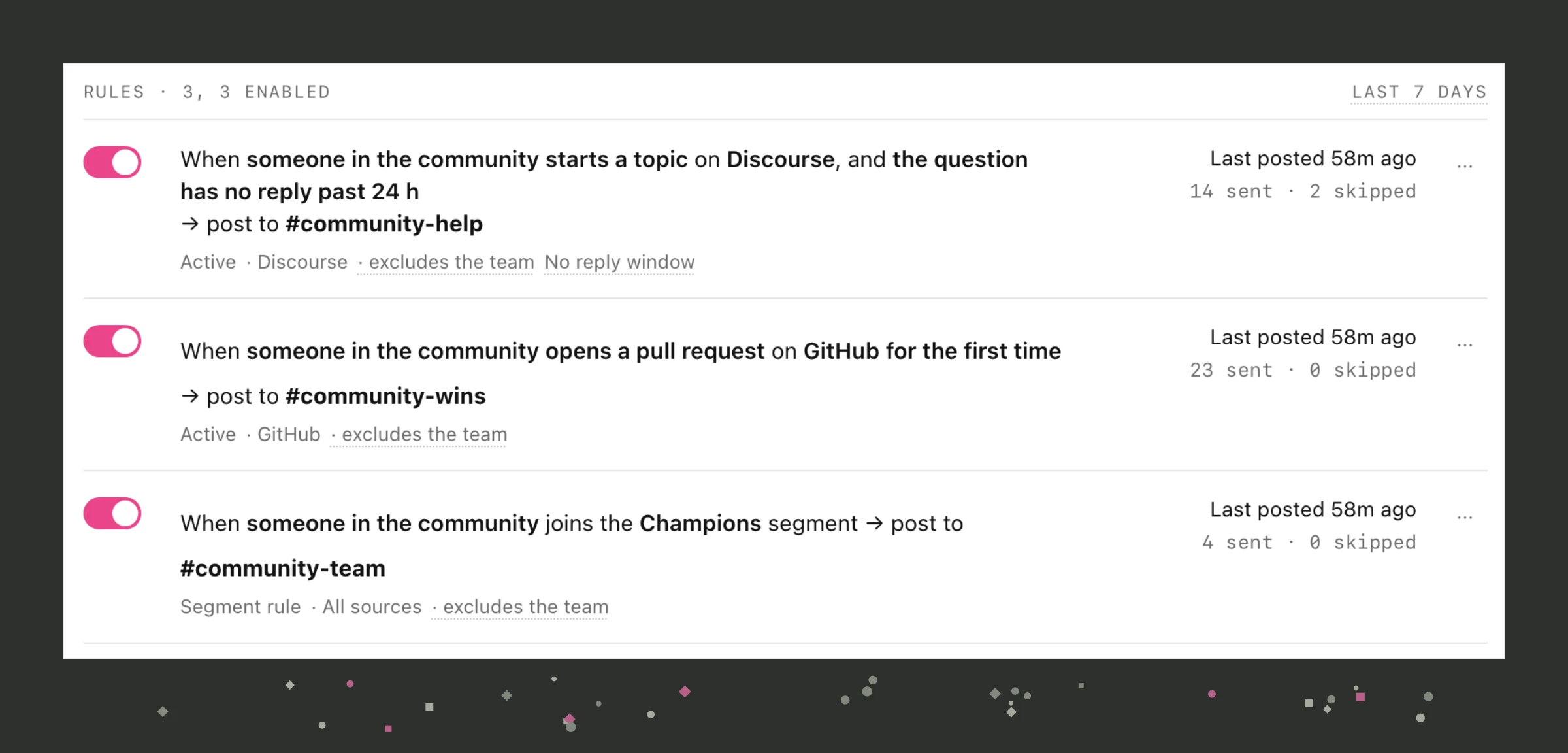
Hover over the code to see what it means. If the app is not in the channel, press Let the app join beside the code. For other reasons, edit the rule or reconnect Slack on the source page. A member’s Routing section shows cards about them.
Losing chat:write pauses routing and holds matching cards. Ingestion continues.
Restore the permission or replace the stored token. Verify the connection.
Datum releases held cards under 24 hours old. Older cards receive held_too_long with their waiting duration. Losing only im:write skips direct messages while channel rules continue.
Other permanent errors skip delivery:
| Reason | Action |
|---|---|
missing_scope |
Grant im:write for direct messages or the required channel-join permission. Reinstall the app. Missing chat:write holds cards instead. |
not_in_channel |
Run /invite @Datum in the channel. |
channel_not_found |
Check the channel. Private channels are unavailable. |
is_archived |
Choose another channel. |
user_not_found, account_inactive |
Choose a current Slack teammate. |
channel_is_a_person |
Select the recipient as a person instead of a channel. |
Datum retries Slack outages and rate limits for about an hour. Cards wait when a connection needs reconnection. After reconnection, cards from the previous 24 hours can post. Older cards skip delivery.
Reply rules ignore questions from before their latest enablement. Enabled rules still process missed questions after worker outages. Discovery handles up to 200 workspaces or rules per job. Evaluation handles up to 200 thread roots per rule. Separate continuation jobs handle subsequent pages.
The needs_reply: {"after_hours": 24} filter checks unanswered community thread roots every five minutes. It excludes threads tagged handled. The delay accepts 1–168 hours.
organisation_tags: ["customer"] matches tags on the actor’s derived organizations. It accepts tag names or ids. Omitting the source covers all sources. CLI, REST and MCP support these filters when creating or updating rules.
What a rule routes
A rule routes activity only after its creation and source connection. Initial syncs can import years of history without announcing that history. The activity remains on member timelines.
Enabling a rule does not announce earlier activity. For example, a rule created in March and enabled in September does not announce summer events.
Each event produces at most one normal delivery per rule. Repeated webhooks and sync pages do not create extra cards. A crash after Slack accepts a card but before Datum records acceptance can cause a duplicate. This retry behavior avoids silently missing the card.
Merges update cards about the affected members from the previous 30 days.
Activity cards currently go only to Slack. They have no daily digests or threading. Each card creates a separate top-level message.
From your terminal or agent
Creating, changing, deleting and testing rules require admin scope. CLI and API rules start enabled unless you disable them.
To test a CLI rule first, add --disabled when you create it. A switched-off rule with no deliveries has state draft.
routing rule show gives lifetime delivery counts. routing rule list gives delivery statistics for seven days, adjustable with --window-days.
Use routing test <rule> --dry-run --json to see sample card blocks. This command also checks the connection, but it does not post.
Use activity --include routing_draft --json to get a rule filter from the current activity filters.
You can make each rule template with routing rule create. For example:
ocmgr routing rule create "Customer issues" --source github --event-types issue_opened \
  --filter '{"organisation_tags":["customer"]}' --connection <id> --channel <id> --disabled
Use --source generic for Push API events, including webhooks. Unknown event types produce a warning and remain available for future events.
CLI-created Claude routines default to on-demand sends. Set events destination create --topics none explicitly, or select automatic topics with --topics.
ocmgr connection discover <connectionId> --json
ocmgr routing rule create "New issues → #support" --source github \
  --event-types issue_opened --filter '{"repo_names":["acme/widgets"]}' \
  --connection <connectionId> --channel C0123456 --disabled
ocmgr routing test "New issues → #support"
ocmgr routing rule update "New issues → #support" --enable
ocmgr routing deliveries --status skipped --json
{ "name": "list_discovered_targets", "arguments": { "connection_id": "<connectionId>" } }
{ "name": "create_routing_rule", "arguments": { "name": "Champions → me", "source": "github", "filter": { "tags": ["champion"] }, "destination_connection_id": "<connectionId>", "destination_user_id": "U0123456" } }
{ "name": "list_routing_deliveries", "arguments": { "status": "skipped" } }curl -X POST "$OCMGR_URL/v1/routing-rules" -H "Authorization: Bearer $OCMGR_API_KEY" \
-H 'content-type: application/json' \
-d '{"name":"New issues → #support","source":"github","event_types":["issue_opened"],"destination_connection_id":"<connectionId>","destination_channel_id":"C0123456","enabled":false}'
curl "$OCMGR_URL/v1/routing-deliveries?status=skipped" -H "Authorization: Bearer $OCMGR_API_KEY"ocmgr routing test --user U0123456 --connection <connectionId> sends a test directly to a teammate without a rule. This checks whether Datum can reach the recipient in Slack.
See create_routing_rule, update_routing_rule, send_routing_test and list_routing_deliveries.
Preview and inspect a rule through the API
ocmgr routing templates --json
ocmgr routing rule show "$RULE" --json
ocmgr routing test "$RULE" --dry-run --json
Use list_routing_templates for starting points and get_routing_rule for lifetime delivery counts. Call send_routing_test with dryRun: true to inspect card blocks without posting.
GET /v1/routing-templates lists the same starting points as the screen. GET /v1/routing-rules/{id} returns lifetime deliveries, state and any event-type warnings. Datum keeps unknown event types for future events. Datum refuses a filter for a different source, and channel IDs with an incorrect format.
Send {"dryRun":true} to POST /v1/routing-rules/{id}/test to receive preview.text and preview.blocks. This checks the destination and the cooldown. It does not send, and it does not use the cooldown. Put dryRun in the JSON body.
To move a rule to a teammate, PATCH /v1/routing-rules/{id} accepts destination_user_email. Archived rules remain readable, refuse edits and tests with 409, and keep their original archive timestamp on repeated archive calls.
FAQ
My rule has never posted anything. Why?
Check whether Who excludes the person as a teammate. Check whether matching activity occurred after rule creation. Select does anything to check for different source event names. Check that a worker is running on self-hosted installations.
See Scaling the worker.
Two identical cards arrived. Is that a bug?
Two rules often match the same event. Each sends its own card. Check the rules list for overlapping conditions.
Can a rule message a community member directly?
No. Direct messages can reach only your team. Datum enforces this restriction.
Does routing count towards usage?
Yes. Each card Slack accepts counts as one outgoing event. Failed and skipped cards do not count. See Usage.