Activity feed
Review community activity across sources. Filter events, tag conversations, and export results.
Overview
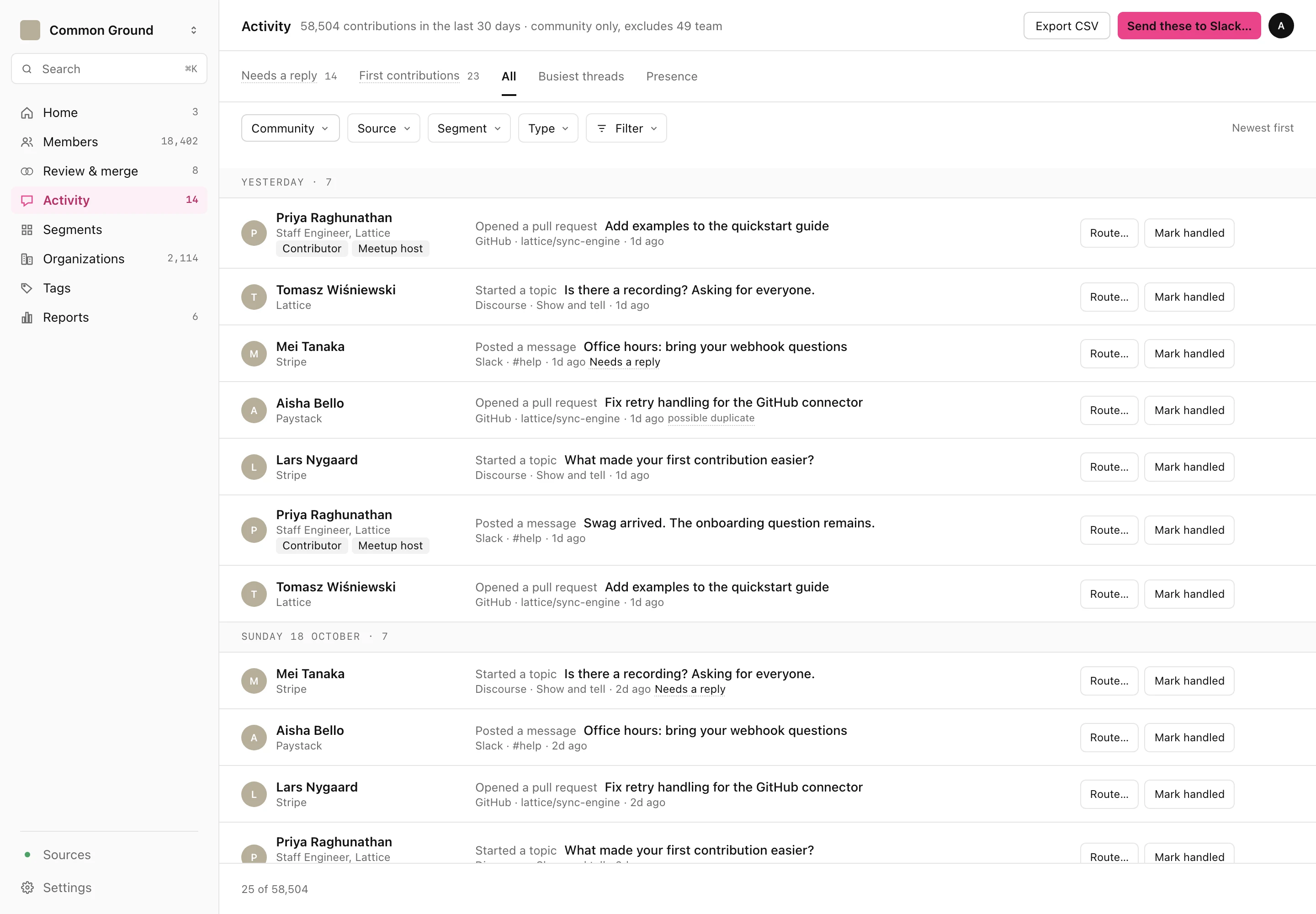
Activity combines events from your sources, including messages, pull requests, forum topics, and registrations. Each event identifies its member. Rows appear newest first, grouped by day in your time zone. The header reads “N contributions in the last 30 days”, for the people the scope selects.
Rows show the person, event type, source, time, and the thread title when the source reports one. Datum never stores message text. Accounts without member links display a label such as “Slack account · not yet linked”.
The default feed excludes your team. Team members have a verified address on a team domain or the reserved team tag.
Configure
Needs a reply identifies unanswered thread-opening questions from outside your team. A question qualifies after the reply window expires with no later activity in the thread. The default window is four hours.
Owners can change this window:
- Open Settings → General → Response timing.
- Set Flag unanswered questions after to a value from one hour to one year.
Basics
Filter the feed
Open Activity. Filters combine to narrow the results.
| Filter | Effect |
|---|---|
| Community, Everyone, Team only | Selects whose activity appears. Community is the default. |
| Source | Selects one kind of source. Every webhook source appears as one Push API entry. |
| Segment | Selects current members of a segment. |
| Type | Selects an event type that the workspace’s sources write. See Filter by a type the menu doesn’t list. |
| Filter → Tone | Selects positive, neutral, negative, mixed, or unclear conversations. See Thread tone. |
| Filter → Actor tag | Selects people with a tag. |
| Filter → Activity tag | Selects tagged conversations. |
| Filter → Title contains | Searches thread titles. It does not search message text. |
| Filter → Started by the member | Excludes reactions, likes, stars, forks, joins, and account changes. |
| Chart handles | Drag the Start date and End date handles on the 30-day chart to select a date range. |
Filter shows how many of its filters are on. An organization’s Recent activity → All link opens the feed with an Organization chip. Select its × to remove it.
The URL includes the filters. Bookmark it to retain the view. Share it with a colleague to show the same results.
Read the status on a row
After the time, a row can show these markers:
| Marker | Meaning |
|---|---|
| Routed → #channel | A routing rule posted the event to Slack. |
| Could not send | A rule matched, but delivery failed. Hover over the status for the reason. |
| possible duplicate | The matcher thinks this account may be someone already in the community. Select it to review the pair in Review & merge. |
| first contribution | The person’s first contribution. See First contributions. |
| Needs a reply | The thread contains a qualifying unanswered question. |
A row without a routing marker matched no rule. A Tone label appears when the conversation has a judgment.
Each row also has these buttons:
- Open ↗ opens the event on its source.
- Route… sends the person’s card, with this thread, to a Slack channel or a teammate, or sends them and the activity to an agent. See Member card. This requires the owner role.
- Mark handled tags the thread
handled, so it leaves Needs a reply. Undo it from the message that appears, or remove the tag later.
Switch views
Five tabs sit above the filters:
- Needs a reply lists qualifying unanswered questions, oldest waiting first. Its count is beside the name. It opens first when the count is above zero.
- First contributions lists people from outside your team contributing for the first time. See First contributions.
- All lists every contribution, newest first.
- Busiest threads ranks conversations by reply count, followed by distinct participant count. Reactions do not count as replies.
- Presence displays visits, including visits without contributions. It has separate controls.
Busiest threads shows the source, latest activity, answer status, latest tone, and negative event count. It supports Community and Team only, but not Everyone. With Everyone chosen, it shows the community.
A segment’s Activity tab uses the same feed, filtered to the segment, with a thread tone summary above it. An organization’s page has a Recent activity panel instead. Its All link opens this feed filtered to the organization, with the organization’s thread tone summary above it.
Filter by a type the menu doesn’t list
Type offers the types that each connected source writes. A webhook source can push any type, such as signed_up or rsvp. The menu lists only the usual types: posts, comments, stars, event registrations, attendance, cancellations and form submissions. To filter by another type, add type=<type> to the page URL, for example /activity?type=signed_up. The CLI’s --type and the API’s type filter accept any type too.
Tag a conversation
- Hover over a row.
- Select Tag.
- Enter a tag name.
- Select Apply tag.
Select several conversations with their checkboxes to tag them together. Use Tag in the selection bar.
A tag applies to the whole conversation, including when you tag a reply. A new name creates a tag. Select the tag’s × to remove it.
People, organizations, and activity share one tag list. Tag changes immediately trigger another evaluation of rules that use tags.
Export
Press Export CSV to export the filtered events. This control requires the owner role. Exports include names and metadata but no message text.
Turn the filters into a routing rule
Select Send these to Slack… to prepare a rule from the current filters. This requires the owner role.
The draft includes supported source, type, tone, tag, and member filters. It identifies unsupported filters, including Segment, Title contains, Since, and Needs a reply.
Enter a rule name. Choose a channel. Enable the rule when its configuration is complete. Preparing the draft does not create a rule.
From your terminal or agent
The CLI, MCP tools, and REST API support the same feed and filters. CLI requests include your team unless you specify --no-team.
CLI feed rows include the person’s name and status markers by default. Use --include routing_draft to copy the current filters into a routing rule.
Both activity threads and activity export accept the feed filters, including --since and --needs-reply.
Filter with ocmgr activity --json to find the event IDs first. Use activity tag <eventId> <tag> --also <eventId...> to tag several conversations atomically. activity untag accepts the same IDs. Both commands reject feed filters and accept --dry-run for a preview.
CSV exports include activity tags and person tags in separate columns.
ocmgr activity --no-team --needs-reply --json
ocmgr activity --source github --type pr --since 2026-09-01 --json
ocmgr activity threads --json
ocmgr activity tag <eventId> feature-request --json
ocmgr activity export --tone negative --format csv --out negative.csv
{ "name": "list_activity", "arguments": { "filters": { "team": false, "needs_reply": true } } }
{ "name": "tag_activity", "arguments": { "event_id": "<eventId>", "tag": "feature-request" } }curl "$OCMGR_URL/v1/activity?team=false&needs_reply=true&include=actor,status" \
-H "Authorization: Bearer $OCMGR_API_KEY"See list_activity, list_busy_threads, tag_activity, untag_activity, and export_activity. Export requires admin scope.
For the header’s calendar window over MCP, request include: ["daily"], days: 30 and your time zone, then sum the daily counts. include: ["totals"] instead returns all matching events as total and the last 28 days as last28Days, including passive events. Those totals are not the 30-day header.
To prepare a routing rule from feed filters, request include: ["routing_draft"] on list_activity. Its routingDraft maps activity tags to filter.activity_tags and actor_tags to filter.tags. Review uncarried. Supply the required inputs. Then give the source, event_types and filter of the draft to create_routing_rule. A draft saves nothing.
First-contribution filters have different meanings in the feed and in routing, so the draft lists them in uncarried.
FAQ
Why is the feed empty?
No source may have imported activity, or the filters may exclude all events. Select Everyone to check whether team exclusion hides the results.
Can I search for a word someone wrote?
No. Datum stores titles and metadata but no message text. Title contains searches published thread titles.
Why does Needs a reply never show for some sources?
The marker requires thread information. Without it, Datum cannot determine whether another event answers the question. A webhook source provides it when each activity includes a threadId: activities with the same threadId form one thread. See Threads from a webhook source.
Why can't I see Export CSV?
Exports include names, so only owners can export activity.
Threads from a webhook source
A webhook source using the standard format can group activities into threads. Add an optional threadId to each activity. Activities that share a threadId are one conversation:
{"activities":[
  {"id":"msg-1","userId":"app-101","type":"message","occurredAt":"2026-11-06T10:00:00Z","ref":"https://forum.example.com/t/7","threadId":"topic-7","text":"Is there a Lagos meetup?"},
  {"id":"msg-2","userId":"app-103","type":"message","occurredAt":"2026-11-06T11:00:00Z","ref":"https://forum.example.com/t/7#2","threadId":"topic-7"}
]}
The first activity in a thread opens it, and later ones are replies. Threaded activities reach Needs a reply (a message with a ref and no reply after the reply window), Busiest threads and the thread tone summaries.
Give the first activity in a thread a title, such as the title of the topic. The thread then shows the title in the feed, on routing cards and in Needs a reply. Title contains matches it. A title is a short label of up to 200 characters. It is never message text.
See the standard JSON format. Datum ignores fields that the format does not list, such as parentId.
First contributions
A first contribution is the earliest contribution across a person’s currently linked accounts. Reactions, stars, forks, and account events do not qualify. The filter excludes your team.
Linking accounts can change which event qualifies as first. Datum cannot account for history beyond a connector’s import coverage. “First” therefore means first in the available history.
Use the API’s first_contribution filter to select these events. Request status to include each row’s firstContribution marker.
Activity filters that use needs_reply or first_contribution include the status markers in the returned rows. Request include=actor,status for names and the full set of markers. Thread titles also appear on replies, so title search and activity exports include the conversation.