Review & merge
Review possible matches. Merge accounts, mark different people, or skip a pair.
Overview
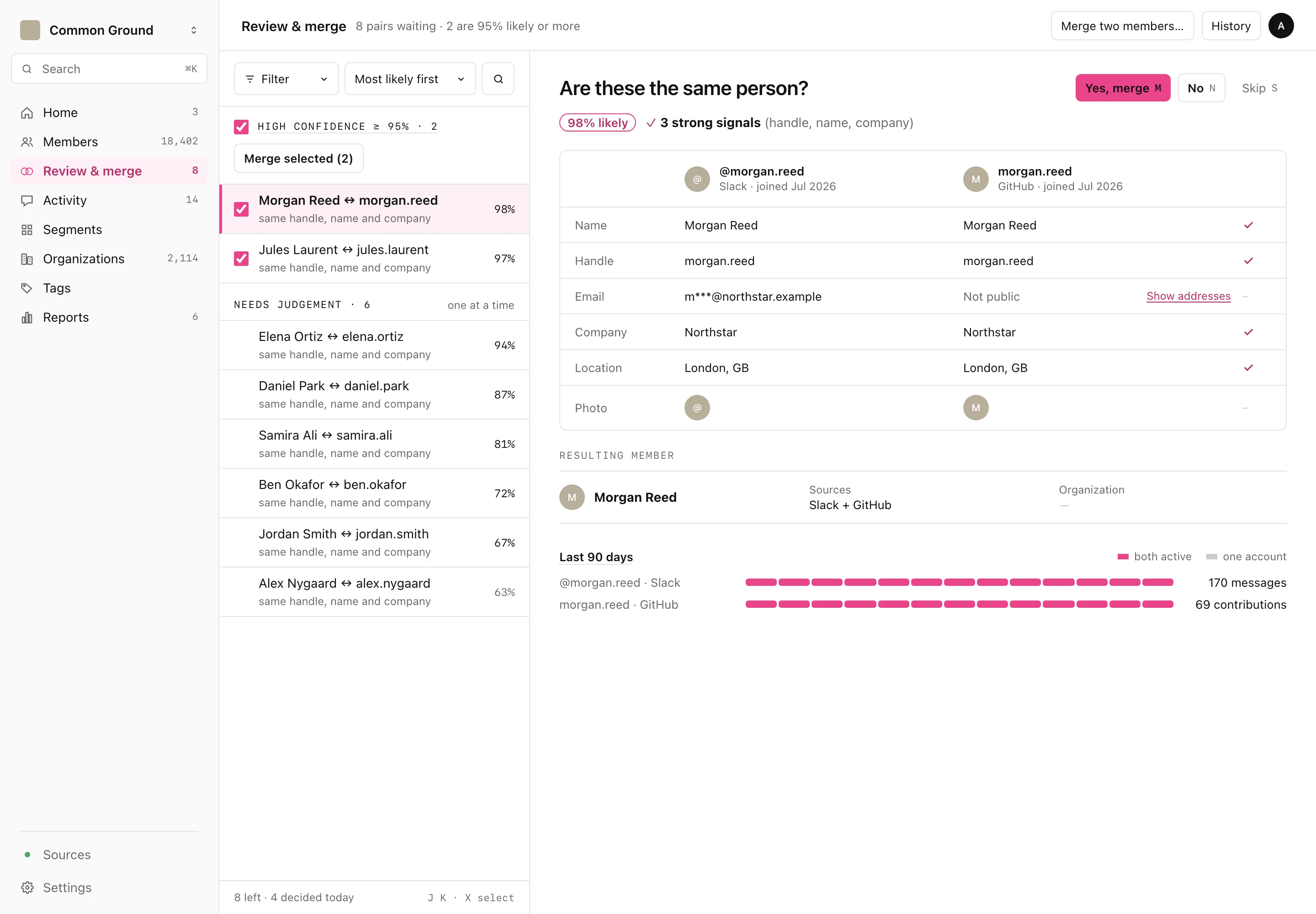
Datum links accounts automatically when strong evidence identifies the same person. Other possible matches require your review. Each pair shows two profiles, the score evidence, and each account’s activity for the last 90 days.
A merge creates a link between accounts. It does not delete them. You can undo a merge from the confirmation message, member page, or History.
Basics
Open the queue
Open Members → Review & merge in the sidebar. Review & merge appears under Members while you are on a Members page. The count shows the number of pairs waiting.
The status menu starts on Waiting. Choose another status to read decided pairs:
| Status | Pairs |
|---|---|
| Waiting | Pairs that need a decision. |
| Skipped | Pairs you skipped. They return when their score rises by 0.10. |
| Decided: same person | Pairs a reviewer merged. A pair keeps this status after its merge is undone, because it records the decision. |
| Decided: not the same | Pairs a reviewer marked as different people. |
| Merged outside review | Pairs linked by the matcher or a manual merge after they entered the queue. |
| No longer likely | Pairs whose score fell out of the review range. |
Use Score floor to review the strongest pairs first: Only 90% and up, Only 80% and up, or Only 60% and up. Most likely first shows every pair.
Make a decision
The heading of each side of a pair shows its account and the name of its source, such as Meetup RSVPs (webhook). Two sources of the same kind keep their own names.
| Decision | Result |
|---|---|
| Merge | Datum combines the accounts into one member. |
| Not the same | Datum records different people and stops proposing the pair. |
| Skip | Datum removes the pair from the queue until its score increases by 0.10. |
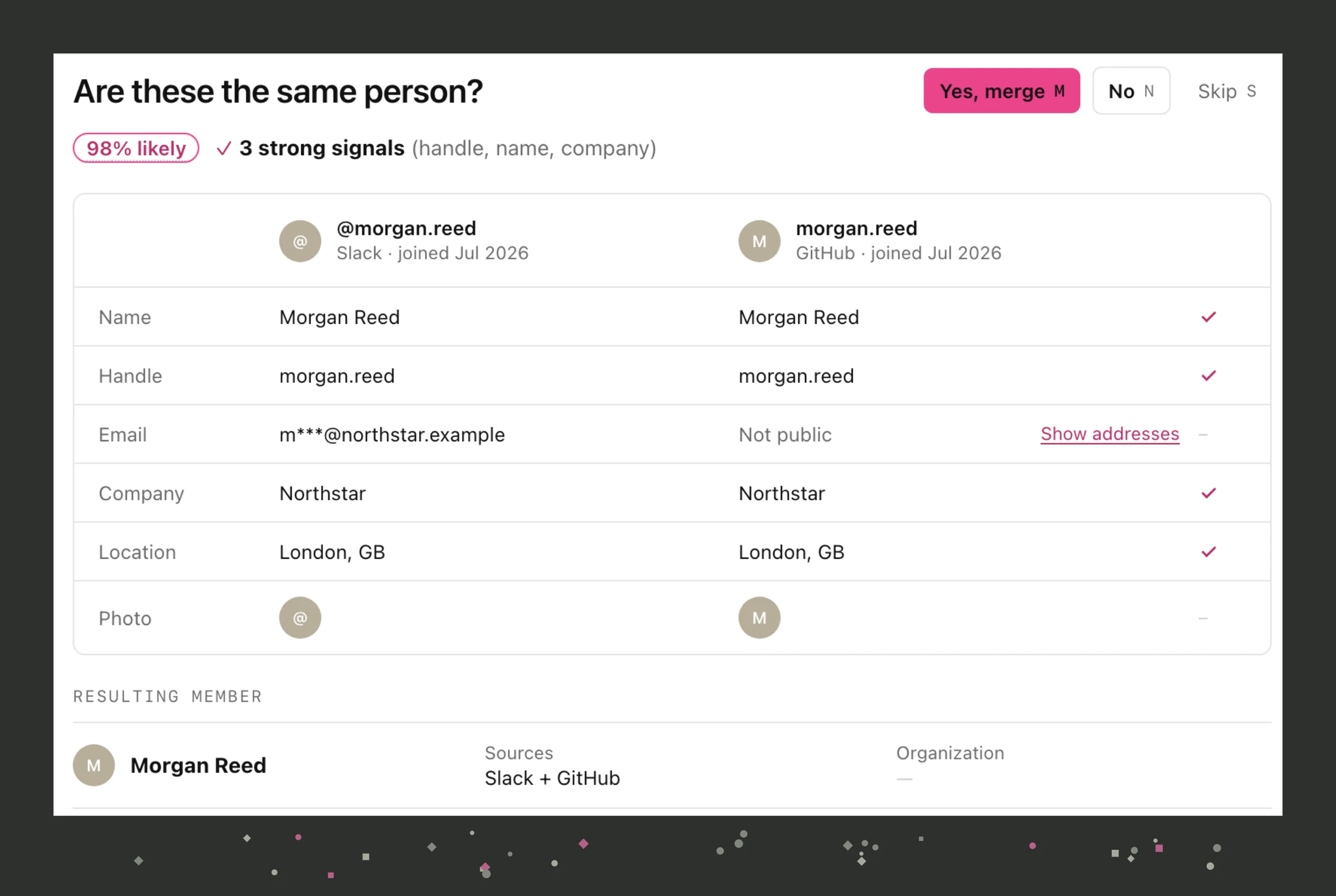
The pair leaves the queue when you make a decision.
| Key | Action |
|---|---|
| J K | Next and previous pair |
| M | Merge |
| N | Not the same person |
| S | Skip for now |
| E | Explain the score |
| R | Change the reason for the next decision |
| X | Check or uncheck the selected high-confidence pair |
| B | Move to Merge selected |
| ? | Show shortcuts |
Accept everything above a score
Pairs that score 95% or higher appear first, in the High confidence ≥ 95% list. Pairs below 95% appear under Needs judgement, one at a time.
- Select the row of each high-confidence pair that you want to merge, and press X. You can also select its checkbox.
- Optional: press R to enter a reason for the batch.
- Press B to move to Merge selected.
- Press Enter.
- Check the number of pairs. If you entered a reason, check the reason too.
- Select Merge.
When the queue opens, no pair is checked. Select all high-confidence pairs checks all pairs in the list, also the pairs that are not loaded yet. Without a reason, History records “batch: high confidence lane”.
Read the summary on each card before you check it. A card that says “…but both are from the same kind of source” has a conflict that needs judgement. Only the kind is important. Two webhook sources with different names are still the same kind. An owner can undo the whole batch from the confirmation message. You can undo each merge separately from History.
Merge two members yourself
- Select Merge two members… at the top of the queue.
- Select both members.
- Optional: add a reason.
- Select Merge.
Merges you confirm have no account limit. The automatic matcher keeps its safety limit.
Datum records you as the link creator. The matcher cannot undo this link.
From your terminal or agent
The CLI, MCP tools, and REST API use the same review queue.
ocmgr review list --min-score 0.9 --json
ocmgr review decide --rank 1 --min-score 0.9 --merge --reason "Same person" --dry-run --json
ocmgr review decide --rank 1 --min-score 0.9 --merge --reason "Same person" --json
ocmgr review decide <reviewItemId> --merge \
  --reason "Same GitHub login in her Slack profile"
{ "name": "get_review_queue", "arguments": { "min_score": 0.9 } }
{ "name": "resolve_review_item", "arguments": { "id": "<reviewItemId>", "decision": "merge" } }curl "$OCMGR_URL/v1/review?min_score=0.9" \
-H "Authorization: Bearer $OCMGR_API_KEY"See get_review_queue and resolve_review_item for every parameter.
Queue positions refer to the current waiting queue and change after every decision. Use the same score and connection filters when listing and deciding. Re-read the first item before each decision. --rank 1 --skip moves on; a saved review-item ID remains the choice when you need to decide exactly an earlier item.
FAQ
Why is a Slack-only workspace full of pairs?
A standard Slack export contains no email addresses. Its accounts cannot link automatically from the export alone.
Connect the Slack app to supply email evidence. The next sync can resolve pairs with sufficient evidence.
Can I undo a merge someone else made?
Yes.
- Open the profile of the member.
- Select Explain under Identity.
- Select Undo this merge on the incorrect link.
You can also undo the link from History.
Undoing a merge records that the accounts belong to different people. This decision prevents another automatic merge.
What does the score measure?
The score combines matching names, handles, avatars, profile links, and organizations. Conflicts reduce the score.
Press E to see the evidence and its contribution. See How matching works for the rules.
I pressed Not the same by mistake.
- Select Merge two members….
- Select both members. The dialog shows your earlier decision: who made it, when and why.
- Select They are the same person: overrule that.
- Optionally enter a reason.
- Select Merge.
Datum revokes the earlier decision. The history keeps both.